


🔥Last Day 50% OFF🔥 Wireless CarPlay & Android Auto Adapter Dongle, Wired to Wi-Fi Conversion for 2016+ Factory CarPlay Cars
🔥Last Day 50% OFF🔥 Wireless CarPlay & Android Auto Adapter Dongle, Wired to Wi-Fi Conversion for 2016+ Factory CarPlay Cars
BUNDLE & SAVE
Couldn't load pickup availability
──── Buy Together & Save ────

🚘Car Registration & Insurance Card Holder

🚰 100 Pack Faucet Filter Cotton Bags – Cleaner Water, Less Splash, No Tools Needed

🔥50% OFF – Stainless Steel Oil-Proof Adhesive Wallpaper Roll for Kitchen Countertops, Cabinets & Backsplash

🔥Last Day 50% OFF🔥 Wireless CarPlay & Android Auto Adapter Dongle, Wired to Wi-Fi Conversion for 2016+ Factory CarPlay Cars
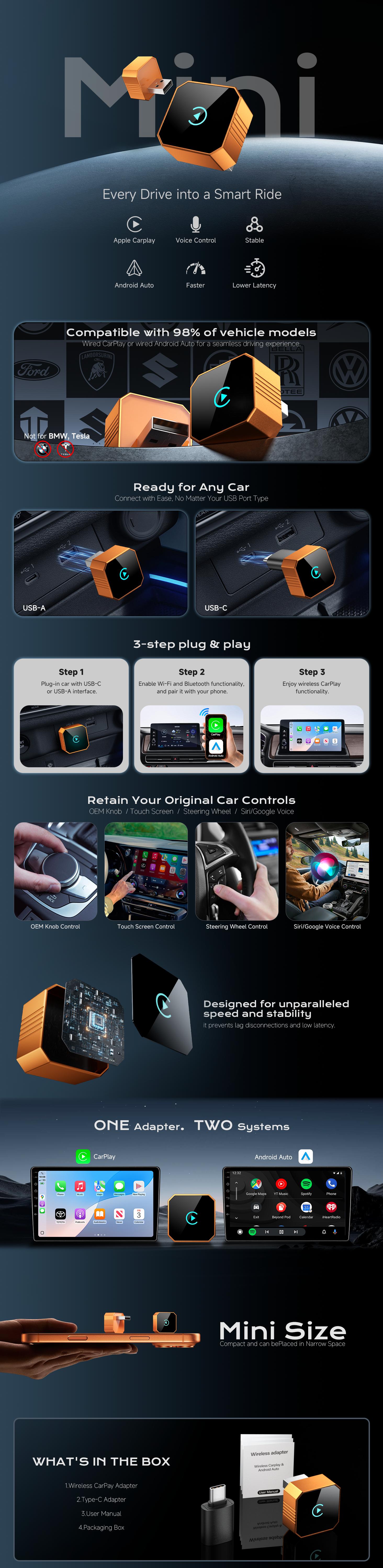
🚗 Turn Wired CarPlay Into Wireless
Wireless CarPlay & Android Auto Adapter — Drive Smarter, Without the Cable
Still plugging your phone into your car every time you get in?
With this compact wireless adapter, you can convert compatible factory-wired CarPlay or Android Auto into a wireless connection—so your phone can stay in your pocket while you enjoy a cleaner, more convenient driving experience.
✨ No More Cable Clutter
📱 Wireless Phone Connection
🚗 Works With Compatible Factory Systems
🔌 Plug & Play Setup
🔄 Easily Switch Back to Wired Mode
🔥 Your Factory CarPlay, Now Without the Cable
Your car already has wired CarPlay or Android Auto.
Why keep reaching for a cable every time you start driving?
Simply connect the adapter to your vehicle's compatible USB port, pair your phone, and enjoy a wireless connection to your factory infotainment system.
No replacement head unit.
No complicated installation.
No need to modify your dashboard.
Just plug it in and go.

📱 Keep Your Phone in Your Pocket
With a wireless connection, you can leave your phone where it is instead of keeping it connected by cable.
Enjoy a cleaner center console with fewer wires getting in the way.
Designed for everyday driving:
🎵 Music & Audio
Keep your favorite audio playing without constantly connecting and disconnecting your phone.
🗺️ Navigation
Use your compatible factory CarPlay or Android Auto interface wirelessly.
📞 Hands-Free Convenience
Keep your phone accessible without having to physically plug it into the car every time.
🚗 Automatic Convenience
Once properly paired, wireless connection makes your everyday driving routine simpler.
⚡ No Installation. No Dashboard Modification.
You don't need to replace your factory screen or install a new infotainment system.
Simply:
① Plug in the adapter
Connect it to your vehicle's USB port.
② Pair your phone
Turn on Bluetooth and Wi-Fi, then follow the pairing instructions on your vehicle screen.
③ Drive wirelessly
Once connected, enjoy your compatible factory CarPlay or Android Auto without the cable.
Want to use wired CarPlay again?
Simply unplug the adapter.
Your vehicle can return to its original wired CarPlay/Android Auto interface.
🔌 Built for Everyday Driving
A compact adapter is designed to stay connected without taking up much space around your center console.
Optimized Heat Dissipation
The adapter uses a heat-dissipation design intended to help maintain stable operation inside the vehicle, including during warmer conditions.
OTA Firmware Updates
Firmware can be updated over the air, allowing ongoing performance optimization and compatibility improvements.

📱 Check Compatibility BEFORE Ordering
⚠️ IMPORTANT — PLEASE READ
This adapter does NOT add CarPlay or Android Auto to a vehicle that doesn't already have it.
Your vehicle must already have factory-wired CarPlay or wired Android Auto.
Your vehicle should meet these requirements:
✅ Factory original infotainment screen
✅ Factory system supports wired CarPlay or wired Android Auto
✅ You can confirm this by connecting your phone to the original USB/data cable
✅ iPhone requires iOS 10.0 or later
✅ Android phones require Android 11.0 or later
✅ Bluetooth and Wi-Fi must be enabled on your phone
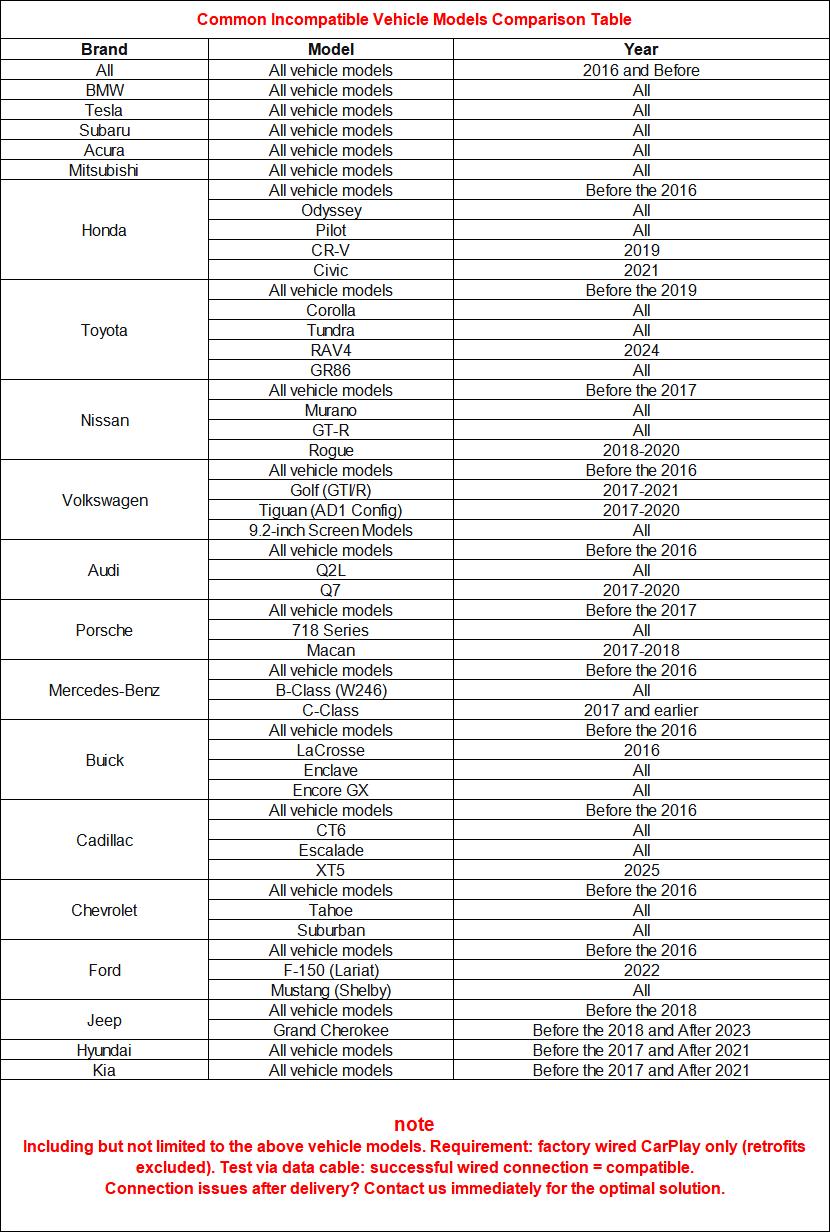
❌ Not compatible with:
- BMW vehicles
- Tesla vehicles
- Vehicles with factory wireless-only CarPlay/Android Auto
- Vehicles without factory-wired CarPlay/Android Auto
- Modified/non-original infotainment systems
- Factory screens without touch control
- Some Mercedes-Benz GLA/GLB/A/B/C-Class models
- Toyota C-HR models manufactured before 2017
- Other vehicles using incompatible proprietary systems
🍎 iPhone & 🤖 Android Compatibility
For iPhone Users
Your iPhone should be running:
iOS 10.0 or later
Make sure Bluetooth and Wi-Fi are turned on during wireless connection.
For Android Users
Your Android phone should be running:
Android 11.0 or later
⚠️ Android Auto compatibility can vary depending on the phone's Google service authorization and the vehicle's protocol.
Some Android phones may have more limited functionality, and features such as steering-wheel controls or voice activation may not be fully supported in certain vehicle/phone combinations.
🛠️ Connection Troubleshooting
My phone can't find the adapter. What should I do?
1. Make sure Bluetooth and Wi-Fi are turned on.
2. On your vehicle's infotainment screen, select Search or Connect New Device.
3. Find “Smart Dongle-xxxx” in your phone's Bluetooth list and complete pairing.
4. If you've previously connected another CarPlay device, clear the old pairing record and try again.
The connection keeps dropping. What should I do?
Check your vehicle's USB power supply first.
The USB port should provide at least 1A / 1000mA.
If the power output is insufficient, try using:
- A cigarette-lighter power adapter
- A Y-cable with an additional USB power source
Also make sure your phone's Wi-Fi is connected to the adapter rather than another hotspot.
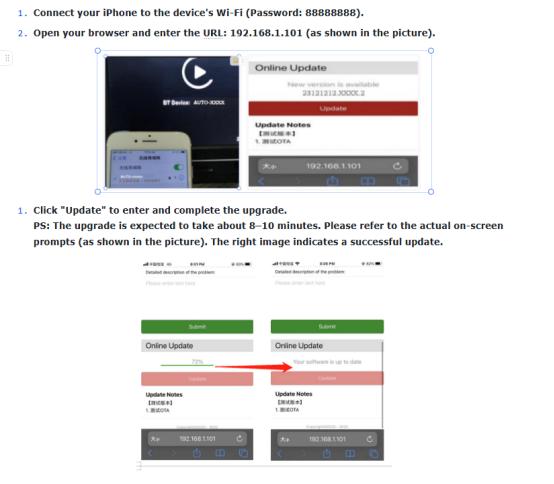
If an OTA firmware update is available, update the adapter to the latest version.
Why is the connection laggy or the audio distorted?
First, check the adapter's firmware.
If an update is available, complete the OTA firmware update and reconnect the device.
Can I watch videos through CarPlay or Android Auto?
No.
CarPlay and Android Auto modes are designed for functions such as navigation and audio and do not support video playback.
🔄 Want to Go Back to Wired CarPlay?
It's easy.
Just unplug the adapter from the USB port.
Your vehicle will automatically return to its original factory wired CarPlay/Android Auto interface.
No settings to reset. No complicated steps.
🚗 One Small Adapter. A Much Cleaner Drive.
Your car already has the technology.
Now you can make it more convenient to use.
No new head unit.
No dashboard modifications.
No permanent installation.
Just connect your compatible factory system and enjoy the freedom of a wireless CarPlay / Android Auto experience.
Less Cable. Less Hassle. More Freedom.
👉 Check Your Vehicle Compatibility & Upgrade Your Drive Today.


Sizing Chart

| Size | Chest | Length | Shoulder |
|---|---|---|---|
| S | 95cm | 61cm | 44cm |
| M | 102cm | 66cm | 46cm |
| L | 106cm | 71cm | 48cm |
| XL | 111cm | 74cm | 51cm |
Give your customers further information about choosing the correct size.